
Instead of rebuilding your meal-prep schedule every week, connect your weekly calendar to recurring meal prep with repeating Google Calendar events for planning, shopping, and cooking. Keep the reminders automatic and the menu flexible, so a changed dinner plan does not derail your whole week.
- For weekly calendar recurring meal prep, Google Calendar repeating events keep planning, shopping, and cooking visible.
- Schedule preparation around the meals you will actually eat at home, not an assumed full week.
- Change one occurrence for an unusual week; change the series only when your routine changes.
- Culinary Collective ATL private chef service suits hosts seeking chef-led dinners; this calendar workflow is for home cooking.
Why this matters
A recurring reminder is useful only when it reflects your real week. If your calendar includes late meetings, school activities, or dinner out, your meal-prep plan needs to account for them before you shop.
Automate the appointment, not the amount of food. A repeating cooking block should prompt you to check the coming week, not prepare the same quantity regardless of your plans.
For your 2026 setup, keep household cooking separate from special-event hosting. Culinary Collective ATL offers private chef dining and catering; this guide explains a do-it-yourself calendar routine, not a service-booking integration.
Before you start
- Calendar access: Use a Google account with permission to create and edit events on the calendar you intend to use. Follow these instructions in Google Calendar on a desktop browser; mobile controls differ.
- Planning materials: Have your household schedule, a grocery list, and information about allergies or dietary restrictions ready. Check your refrigerator and freezer before deciding what to cook.
- The recurring-event gotcha: Moving an event does not move your grocery order, update a recipe, or change another person's calendar automatically. Also, editing one occurrence and editing the entire series are different actions; check the scope before saving.
Choose one person to maintain the schedule. Other household members can contribute preferences, but a clear owner prevents conflicting changes and duplicate shopping.
You do not need another scheduling tool for this workflow. Google Calendar holds the appointments, while the event descriptions hold the instructions you need when those appointments arrive.
Your weekly planning event
Start with the decision that controls everything else: which meals you actually need. Do this before creating a long cooking appointment.
Create the repeating appointment
- Open Google Calendar on your computer and select the day and time you want to review the coming week.
- Select Create, then Event. Name the event Weekly meal plan.
- Set aside 15 minutes as a starting planning block. This is a suggested appointment length, not a promise that every household will finish within it.
- Select Does not repeat, then Custom. Set the event to repeat every week on your chosen day, then select Done.
- Add the planning checklist below to Description, then select Save.
Use this checklist in the description:
- Check meals away from home.
- Count the lunches and dinners you need.
- Check ingredients already on hand.
- Choose meals and serving quantities.
- Identify portions that need freezing.
- Finish the grocery list.
Expected result: Your calendar shows a repeating planning appointment, and opening it reveals the same decision checklist each week.
Make the checklist useful
Avoid putting a permanent menu in the event title. A title such as Weekly meal plan survives a busy week, a holiday, or a change in dietary needs without becoming misleading.
Put the current week's decisions in that week's event description. When Google Calendar asks which events to update, choose This event for a menu that applies only to that occurrence.
For your first 2026 planning cycle, count actual eating occasions rather than assuming everyone needs every lunch and dinner prepared. Include any meal where household members will eat different things or at different times.
Your shopping and cooking blocks
Once planning has a home, give shopping and preparation their own appointments. A calendar event that simply says Meal prep leaves too many decisions until the moment you need to start.
Add the shopping appointment
- Create a separate event named Grocery check and shopping.
- Place it after your planning appointment and before your cooking appointment. Choose a time that matches how you actually obtain groceries.
- Use Does not repeat and Custom to make the appointment repeat weekly.
- In Description, add your grocery list or a note identifying where you maintain it. Include a reminder to check pantry staples before buying replacements.
- Select Save and confirm that the shopping appointment appears before cooking in the calendar.
Expected result: You have a visible purchasing step between choosing meals and preparing them. Your calendar reminds you to obtain ingredients; it does not place an order.
Add the preparation appointment
- Create another event named Cook and portion.
- Reserve 60 minutes as an initial planning estimate, then adjust the appointment to match your recipes and your own pace.
- Set it to repeat weekly using Does not repeat, Custom, and Done.
- Add your preparation sequence to Description: check ingredients, prepare components, cook, portion, label, and clean up.
- Include any recipe-specific timing that affects when you must begin. Save the event.
Expected result: Your calendar shows separate planning, shopping, and cooking appointments in the order you need them.
Do not force a recipe into the appointment simply because the calendar block ends. Choose a shorter preparation task or extend the block after checking the rest of your schedule.
Keep the sequence visible
Use the same event names each week so you can recognize the routine at a glance. The sequence matters more than choosing a particular weekday.
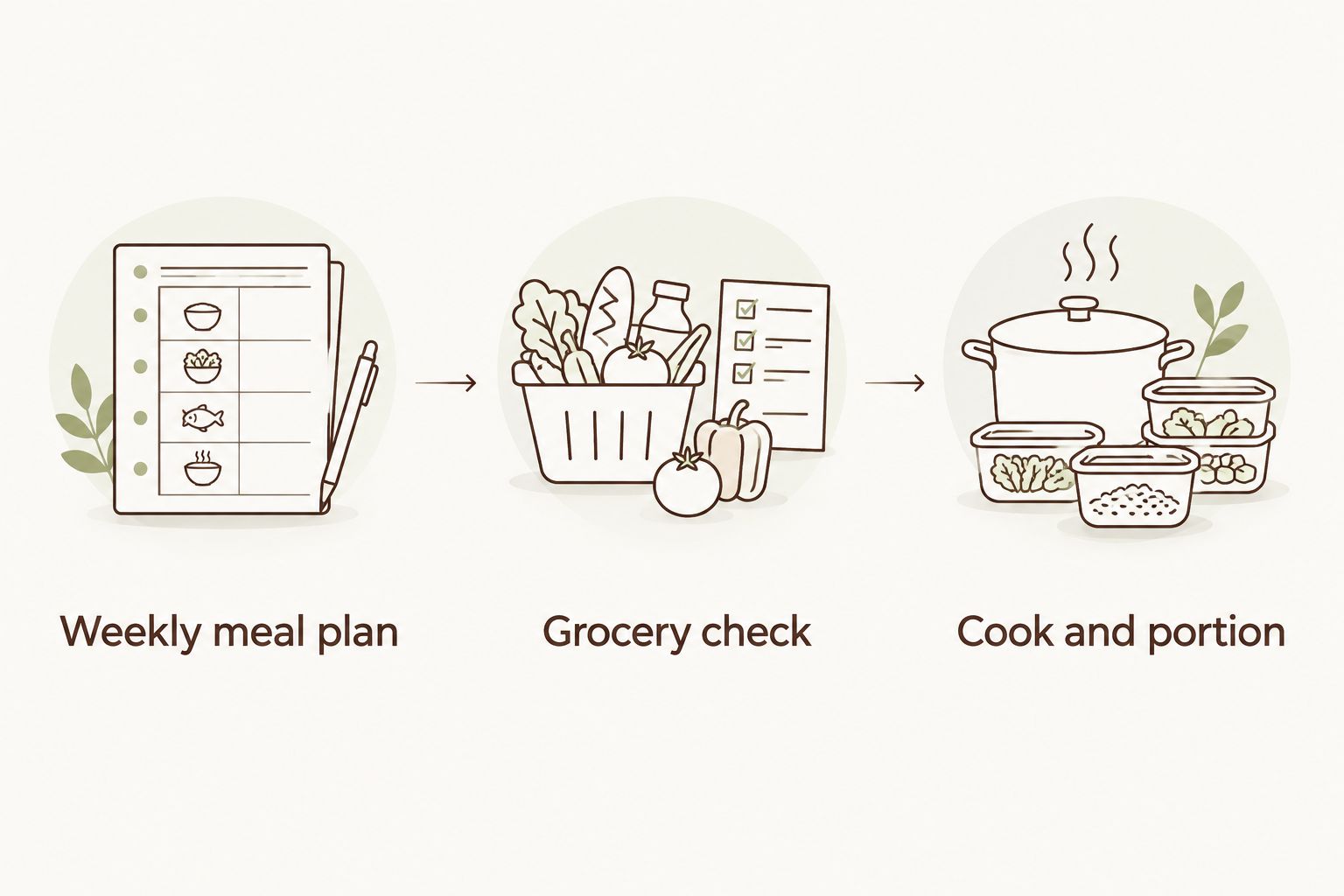
A Sunday cooking block is not helpful if Sunday is consistently your busiest day. Put preparation where you have usable time, then work backward to schedule shopping and planning.
Your reminders and weekly check
A recurring event solves forgetting. It does not solve an unrealistic schedule, so test the routine before treating it as permanent.
Set a useful notification
- Open your Cook and portion event and select the edit pencil.
- Find Add notification and choose a reminder that gives you enough time to get ready. Use 30 minutes before the event as an initial setting if that suits your routine.
- Save the change. Choose All events if you want that notification applied throughout the recurring series.
- Check that calendar notifications are permitted on the device where you expect to receive them.
Expected result: The event has a notification attached, and your device is allowed to display calendar alerts. The reminder does not confirm that ingredients are ready.
Review the routine after using it
Reserve 10 minutes during your next planning appointment to compare the schedule with what actually happened. Ask whether ingredients arrived in time, cooking fit the block, and prepared portions matched demand.
If preparation ran over, change the menu, the quantity, or the appointment length. Do not add more reminders to compensate for a block that cannot accommodate the work.
Keep your 2026 recurring schedule simple until it fits your household. Add more events only when they represent a separate action you repeatedly forget.
A second workflow: prep around a changing calendar
A fixed weekly cooking block works well when your schedule is predictable. If your work shifts, travel, or family commitments change, use the recurring planning appointment as an anchor and move the cooking occurrence each week.
Both workflows use Google Calendar. Neither requires a connection to a meal-delivery service or a chef's booking system.
| Workflow | Best for | Advantage | Limitation |
|---|---|---|---|
| Fixed weekly block | Households with a dependable preparation window | Keeps the same appointment visible every week | Needs exceptions when that window becomes unavailable |
| Weekly planning anchor | Households with changing work or family schedules | Lets you place cooking around the actual week | Requires a scheduling decision during each planning session |
Move cooking when the week changes
- Open the specific Cook and portion occurrence that conflicts with another commitment.
- Select the edit pencil and change its date or time.
- Select Save, then choose This event when asked which occurrences to update.
- Check whether shopping also needs to move. Edit that occurrence separately if ingredients would otherwise arrive too late.
- Recheck the meals you intend to cover before keeping the original quantities.
Expected result: The unusual week has a workable cooking appointment while the rest of the recurring series keeps its normal schedule.
Choose the fixed weekly block for consistency; choose the planning anchor for flexibility. Neither approach is better if you routinely ignore its planning step.
For a 2026 holiday or travel week, deleting one unnecessary occurrence is cleaner than leaving an appointment you already know you will skip. Review the following week's plan separately rather than assuming the missed preparation must be doubled.
Troubleshooting your recurring meal-prep calendar
Every future event changed when you edited dinner plans
You edited the series rather than one occurrence. Restore the recurring description to its reusable checklist, then put the week-specific menu into the individual event using This event.
Keep permanent instructions and temporary decisions distinct. Allergy reminders belong in the reusable checklist; a particular week's serving count belongs in that occurrence.
The reminder arrives, but you cannot start cooking
Check the dependency that failed: ingredients, kitchen access, or enough uninterrupted time. Move the shopping appointment earlier or reduce the preparation task before changing the reminder.
An alert is not a readiness check. Add a short ingredient check to the planning event if missing ingredients repeatedly stop the cooking block.
Two household members buy the same ingredients
Assign one shopping owner and maintain one current grocery list. A shared calendar makes the appointment visible, but visibility alone does not assign responsibility.
If another person takes over shopping, update the event description so the change is explicit. Do not rely on someone interpreting an event invitation as a task assignment.
Your prepared food lasts longer than your safe storage plan
Freeze suitable portions rather than treating the whole week as refrigerator storage. USDA guidance is to keep refrigerators at 40°F or below and use refrigerated cooked leftovers within 3–4 days.
Refrigerate perishable food within 2 hours of cooking, or within 1 hour when the surrounding temperature exceeds 90°F. A calendar reminder supports these actions; it does not replace safe cooling, storage, or reheating practices.
Calendar alerts never appear
Check the event's notification setting, then the notification permissions for your browser or calendar app and device. Also confirm that you are viewing the calendar containing the event.
Create a short test appointment before relying on reminders for your next preparation session. Keep the event description usable even when an alert is missed.
Customize your workflow
Once the basic sequence works, add information that prevents a real mistake. Useful additions include a household meal count, dietary restrictions, freezer portions, and who handles shopping or cleanup.
Keep detailed recipes in your usual recipe collection rather than copying long instructions into every recurring event. The calendar should tell you what happens next and where to find what you need.
For your 2026 schedule, separate ordinary household preparation from a celebration requiring a different level of attention. Culinary Collective ATL private chef service is best for hosts who want a chef-led private dinner rather than a do-it-yourself cooking routine. The service covers custom in-home dining, vacation rental chef services, and retreat catering across Metro Atlanta and North Georgia.
The trade-off is coordination: a hosted dinner still needs a clear date, guest count, dietary requirements, and a suitable plan for the space. A household calendar checklist is useful preparation, but it is not a confirmed event booking.
FAQ
How do I set up weekly calendar recurring meal prep?
Create repeating Google Calendar events for planning, shopping, and cooking. Put shopping before preparation, and update the individual week’s menu without replacing the reusable checklist.
Can Google Calendar automatically choose my meals?
The workflow in this guide does not choose meals automatically. Google Calendar holds your repeating appointments and reminders; you choose recipes and quantities during the planning event.
What if my meal-prep day changes every week?
Keep a recurring planning appointment and move each week’s cooking occurrence to an open time. Select This event when saving so you do not move the entire series.
Should I prepare a whole week’s food at once?
Prepare only what your eating schedule and safe storage plan support. USDA guidance limits refrigerated cooked leftovers to 3–4 days; freeze suitable portions intended for later use.
Can I share the meal-prep calendar with my household?
You can share a Google Calendar with household members using its sharing settings. Assign shopping and cooking responsibilities explicitly, because seeing an event does not establish who owns the task.
Does this calendar setup book a chef with Culinary Collective ATL?
No, these recurring events do not book Culinary Collective ATL or connect to its scheduling. The guide describes a household cooking routine, separate from private dinner, vacation rental, or retreat arrangements.
One last thing
Schedule a check of what you already have before scheduling more cooking. A freezer portion, an unused ingredient, or a dinner away from home can change the entire preparation plan.
Your recurring calendar should protect time for useful decisions, not create an obligation to cook food you do not need. Keep the appointments consistent and let the quantities change.
Related guides